How It Works
A tracking session has five steps plus an automatic token refresh, and runs in one of two modes: SDK-managed login or App-managed token. The flow is the same on Android and iOS; the differences are called out per step.
Overview
Two modes
Choose a mode with the second argument of initAndStartTracking(), skipLoginAndRegistration.
- SDK-managed login (
skipLoginAndRegistration = false) - the SDK gets the token and calls the login API for you. Use it when your backend is Intelomatic. - App-managed token (
skipLoginAndRegistration = true) - your app already has an access token from its own login flow and passes it to the SDK.
import {initAndStartTracking} from './src/TrackingSdk';

// SDK-managed login
const result = await initAndStartTracking(username, false);

// App-managed token
const resultWithToken = await initAndStartTracking(username, true, accessToken);
initAndStartTracking() initializes the SDK and starts tracking in one call.
Steps at a glance
| Step | SDK-managed login | App-managed token | Who sends it | Calls |
|---|---|---|---|---|
| 1. Get token | ✅ | Skipped | SDK | Auth base URL |
| 2. Log in | ✅ | Skipped | SDK | Registration base URL |
| 3. On duty event | ✅ | ✅ | Your app | Events API |
| 4. Location push (repeats) | ✅ | ✅ | SDK | Tracking server URL |
| 5. Off duty event | ✅ | ✅ | Your app | Events API |
| Token refresh (every 24 hours) | ✅ | Skipped | SDK | Auth base URL |
Sequence
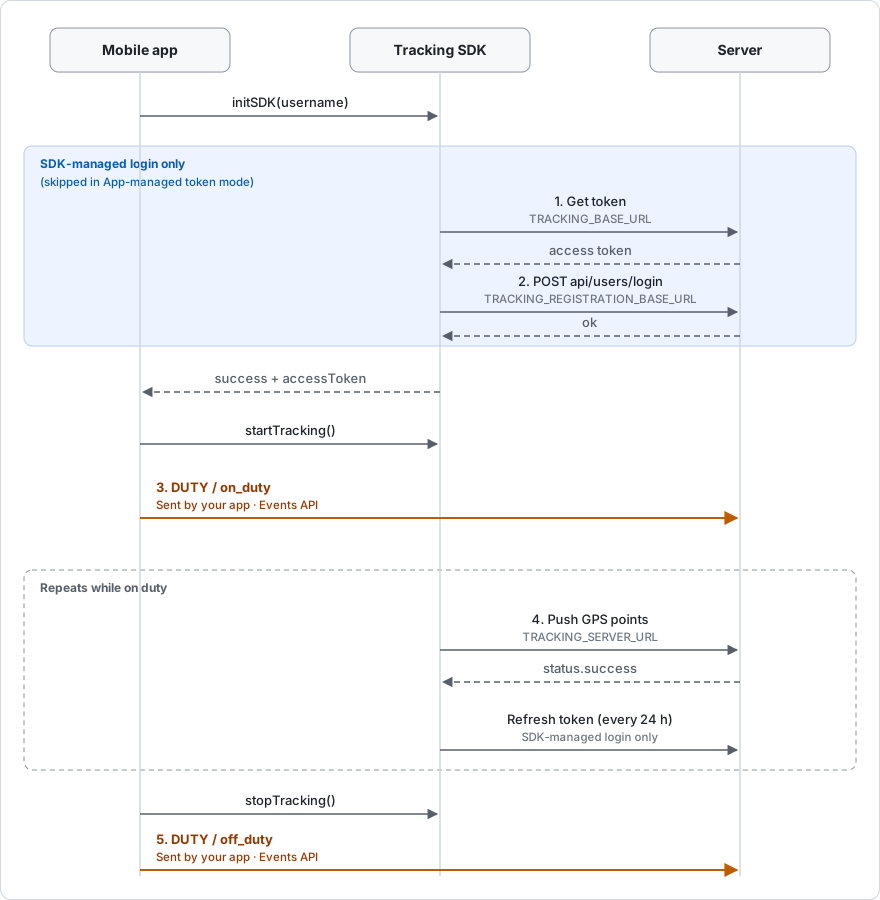
Orange arrows are requests your app sends. Dashed arrows are responses. Tap the diagram to open
it full size. In React Native, initAndStartTracking() covers both initSDK() and
startTracking() in the diagram.
Configuration
The six values are set in a different place on each platform:
- Android reads them from
BuildConfiginandroid/app/build.gradle. - iOS reads them from the
iosTrackingConfigobject insrc/TrackingSdk.ts.
// Android: android/app/build.gradle
buildConfigField "String", "TRACKING_BASE_URL", '"YOUR_BASE_URL"'
buildConfigField "String", "TRACKING_REGISTRATION_BASE_URL", '"YOUR_REGISTRATION_BASE_URL"'
buildConfigField "String", "TRACKING_SERVER_URL", '"YOUR_PUSH_API_URL"'
buildConfigField "String", "TRACKING_API_KEY", '"YOUR_API_KEY"'
buildConfigField "String", "TRACKING_CLIENT_ID", '"YOUR_CLIENT_ID"'
buildConfigField "String", "TRACKING_TENANT_NAME", '"YOUR_TENANT_NAME"'
// iOS: src/TrackingSdk.ts
const iosTrackingConfig: IosTrackingConfig = {
  authBaseUrl: 'YOUR_BASE_URL',
  registrationBaseUrl: 'YOUR_REGISTRATION_BASE_URL',
  trackingServerURL: 'YOUR_PUSH_API_URL',
  apiKey: 'YOUR_API_KEY',
  clientId: 'YOUR_CLIENT_ID',
  tenantName: 'YOUR_TENANT_NAME',
};
Android BuildConfig | iOS iosTrackingConfig | SDK-managed login | App-managed token | Used for |
|---|---|---|---|---|
TRACKING_BASE_URL | authBaseUrl | ✅ | ✅ Android — iOS | Base URL for getting and refreshing the token |
TRACKING_REGISTRATION_BASE_URL | registrationBaseUrl | ✅ | — | Base URL for the login call |
TRACKING_SERVER_URL | trackingServerURL | ✅ | ✅ | Full URL the SDK pushes GPS points to |
TRACKING_API_KEY | apiKey | ✅ | — | API key sent with token requests |
TRACKING_CLIENT_ID | clientId | ✅ | — | Client ID sent with token requests |
TRACKING_TENANT_NAME | tenantName | ✅ | ✅ | Tenant that receives the data |
✅ = required, — = not required. On Android, a required field left blank fails with
SDK_CONFIGURATION_ERROR. On iOS, initAndStartTracking() throws before calling the SDK. Values
in BuildConfig and in src/TrackingSdk.ts ship inside the app, so do not treat them as secret
storage.
Steps
Step 1 - Get token
App-managed token: Skipped. The SDK uses callerAccessToken instead.
Calls: the auth base URL (TRACKING_BASE_URL / authBaseUrl), with the API key and client ID.
The SDK requests an access token inside initAndStartTracking(). Your app does not call a token
endpoint.
On success, initAndStartTracking() resolves with an object that contains the token:
{
  success: true,
  message: 'Tracking started successfully',
  accessToken: '<access token>',
  username: 'driver-001',
  // Android only:
  skipLoginAndRegistration: false,
  distanceFilter: 50,
}
Keep accessToken. Your app needs it for the on duty and off duty events. Do not log this object,
because it contains the token.
Step 2 - Log in
App-managed token: Skipped.
Calls: POST {registration base URL}api/users/login.
Right after it gets the token, still inside initAndStartTracking(), the SDK calls the login API
to sign the user in for tracking. The call resolves only when both the token call and the login
call succeed. Your app does not call this endpoint.
Set the registration base URL with a trailing slash, for example https://example.com/, so the SDK
builds https://example.com/api/users/login.
Step 3 - On duty event
App-managed token: Required.
Calls: the Events API on your tenant gateway.
The SDK does not send this event. Your app must send it, right after initAndStartTracking()
resolves:
POST $BASE_URL/api/ndms2/events?api-key=<apiKey>
Authorization: Bearer <accessToken>
Content-Type: application/json

{
  "typeCode": "DUTY",
  "actionCode": "on_duty"
}
$BASE_URL is your tenant gateway, https://api-gw.sovereignsolutions.com/gateway/<tenant>. It
is not the auth base URL. See Authentication.
Use the accessToken from step 1, or your own token in App-managed token mode.
Step 4 - Location push
App-managed token: Runs, using callerAccessToken.
Calls: the tracking server URL (TRACKING_SERVER_URL / trackingServerURL), with the access
token as a bearer token.
While tracking runs, the SDK sends batches of GPS points to the tracking server URL. Your app does nothing in this step. If the device is offline, points are kept on the device and sent when the network returns.
Each point identifies the user and the device:
| Field | Value |
|---|---|
driver | The username you passed to initAndStartTracking() |
trackerId | Device ID and username, <deviceId>@<username> |
timestamp | Time of the GPS fix, ISO 8601 UTC, for example 2026-07-25T04:30:00.000Z |
lat, lng | Position in decimal degrees |
The fourth argument of initAndStartTracking(), distanceFilter (default 50), is passed to the
SDK's distance filter on Android only. The iOS bridge does not pass it to the SDK.
To read positions back, use trackerId with the Tracking API.
Step 5 - Off duty event
App-managed token: Required.
Calls: the Events API on your tenant gateway ($BASE_URL, as in
step 3).
The SDK does not send this event. Your app must send it, right after stopTracking()
resolves:
POST $BASE_URL/api/ndms2/events?api-key=<apiKey>
Authorization: Bearer <accessToken>
Content-Type: application/json

{
  "typeCode": "DUTY",
  "actionCode": "off_duty"
}
Token refresh
App-managed token: Skipped. The token comes from your app, so your app renews it.
Calls: the auth base URL (TRACKING_BASE_URL / authBaseUrl), with the API key and client ID.
The SDK refreshes the access token every 24 hours while tracking runs.
| Platform | Manual refresh from JavaScript |
|---|---|
| iOS | refreshAccessToken() refreshes now and returns the new access token. SDK-managed login only. |
| Android | Not available. The Android bridge does not implement refreshAccessToken(); calling it throws. |
On iOS, call refreshAccessToken() before sending an on duty or off duty event if your stored
token may have expired.
Errors
The native bridges reject the promise with these codes:
| Code | Platform | When |
|---|---|---|
USERNAME_REQUIRED | Android | username is empty |
CALLER_ACCESS_TOKEN_REQUIRED | Android | App-managed token mode, but no callerAccessToken was passed |
INVALID_DISTANCE_FILTER | Android | distanceFilter is not a number >= 0 |
SDK_CONFIGURATION_ERROR | Android | A required BuildConfig value is blank |
UNSUPPORTED_ANDROID_VERSION | Android | The device runs Android below 6.0 |
INIT_SDK_ERROR | Android, iOS | The token call or the login call failed |
START_TRACKING_ERROR | Android, iOS | Tracking could not start |
STOP_TRACKING_ERROR | Android, iOS | Tracking could not stop |
GET_STATE_ERROR | Android, iOS | The tracking state could not be read |
TOKEN_REFRESH_ERROR | iOS | refreshAccessToken() failed |
DEVICE_HEALTH_ERROR | Android | getDeviceHealth() failed |
Before calling the native bridge, src/TrackingSdk.ts throws a plain Error on both platforms
when username is empty, distanceFilter is not a number >= 0, or callerAccessToken is missing
in App-managed token mode. On iOS it also throws when a required iosTrackingConfig value is
missing.
See also: Authentication, Usage, Troubleshooting.